
BenQ ScreenBar Halo 2 Review: Front Light, Back Glow, and a Dial on the Desk
4 min read
As an Amazon Associate we earn from qualifying purchases. Nobody paid to be on this page; we only list what we would hand to a friend. We have not laboratory-tested these items — we read the specifications and hundreds of buyer reviews, praise and complaints alike, and chose accordingly.
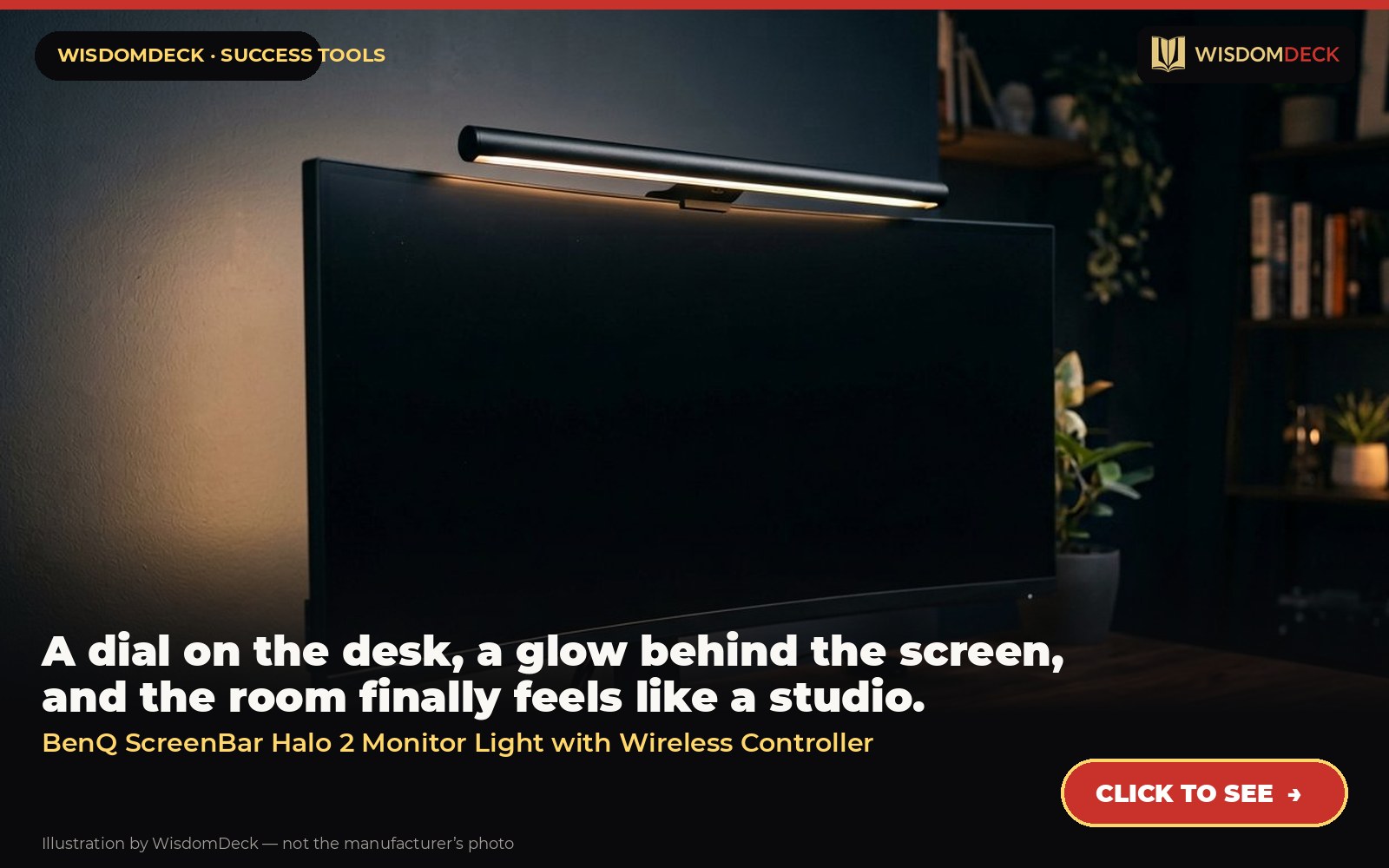
Click hereto see it→Click to see the BenQ ScreenBar Halo 2 Monitor Light with Wireless Controller
A dial on the desk, a glow behind the screen, and the room finally feels like a studio.
The problem it solves
The original ScreenBar lights the desk; the Halo adds a backlight on the wall behind the monitor, which cuts the contrast between a bright screen and a dark room, and a wireless dial so you adjust light without reaching up. For people who work late in a dark room, the contrast reduction is what their eyes notice.
What it is
The premium version: wireless desktop dial, a rear backlight for the wall, motion sensor, fits curved monitors.
From the manufacturer’s own listing, the features that matter:
- Enhanced Backlight For Visual Comfort: Wide and adjustable ambient backlight reduces contrast between your screen and dark surroundings, helping your eyes stay relaxed and focused for longer.
- GLARE-FREE FRONT LIGHT (ASYM-Light Technology): Precision front lighting at an 18° anti-glare angle illuminates your desk without reflecting on your screen or shining into your eyes, perfect for any monitor setup.
- Wireless Controller For Easy Adjustments: The intuitive wireless dial controls brightness, color temperature, and modes, with a built-in display showing precise values for easy fine-tuning.
- Customizable Light Settings: Choose from stepless brightness levels and a wide color temperature range (2700K – 6500K) to suit different times of day and tasks.
- Space-Saving Clamp With Wide Monitor Compatibility: Securely mounts on monitors 0.17" – 2.36" (0.43 – 6 cm) thick and 1000R – 1800R curved, without damaging the screen, freeing up valuable desk space.
- Smart Lighting Features: Automatically turns on/off with your monitor, adjusts brightness with ambient light, and remembers your last used settings with “My Favorite” mode.
- Built To Last: Long-lasting LED with a tested lifespan of over 50,000 hours. Built with reliable quality to ensure years of use without dimming, flickering, or damage.
Who it is for
People who spend evenings at the desk and want the whole workspace lit, not just the keyboard.
How to use it in a routine that sticks
Front light for paper and keyboard, back glow turned up as the room darkens. Use the dial’s preset for the evening setting so the end-of-day block starts with one press. Keep the brightness slightly lower than you think you need; eyes adapt and the softer setting fatigues less.
What buyers say
Praise. The wireless dial and the backlight are what owners rave about; it is the one that makes the room feel designed.
Complaints. It costs roughly twice the basic bar; the extra is for convenience and ambience, not more light.
Who should skip it
It costs noticeably more than the standard ScreenBar; if your desk is against a bright wall or you work in daylight, the extra glow does little. Check fit on very curved screens.
Alternatives worth a look
- Quartet Glass Whiteboard — a plan on the wall that competes with nothing on the screen.
- YSAGi Leather Desk Pad — anyone who wants a cheap desk to feel like an intentional workspace.
Verdict
The premium version for people who do their best work after dark. Otherwise the standard ScreenBar is enough.
Click hereto see it→Click to see the BenQ ScreenBar Halo 2 Monitor Light with Wireless Controller
Two books to go with it
Essentialism by Greg McKeown
Doing less, deliberately — the book to read before buying anything.
Essentialism (paperback) Click hereto see it→
Atomic Habits by James Clear
The clearest guide to making small behaviors stick; read it with a pen and a specific habit in mind.
Atomic Habits (paperback) Click hereto see it→
Links are affiliate links; the price to you is identical. Nothing here is medical or professional advice; these are tools for home office routines, not treatments.
More picks, with pictures
Three tools and three books that fit the same goal. Each has its own full review here, including who should skip it.
As an Amazon Associate we earn from qualifying purchases. Images are our own review cards, not product photos.




Launch list
Be there on day one.
One email when the book opens on Kickstarter. Nothing else. Already reading the book? Your Cheat Sheet is at wisdomdeck.com/free.
Coming soon on 
The book itself — 40 laws in ten parts, 320 pages, each ending with The Work — is funded first on Kickstarter.